
Ritesh Nayak
Notion Developer
5 Common Business Workflow Problems Notion Can Solve
•
13
Running a business often means dealing with messy workflows, scattered tools, and missed deadlines. Notion helps solve five major workflow issues by centralizing tasks, improving collaboration, and keeping teams aligned. Here’s a quick breakdown:
Task Mismanagement: Assign clear ownership and track progress with Kanban boards and templates.
Poor Collaboration: Avoid jumping between tools by combining communication, documentation, and tasks in one workspace.
Scattered Information: Centralize all critical documents in a single, searchable hub.
Limited Progress Tracking: Use real-time dashboards and linked databases to monitor progress.
Scaling Challenges: Build flexible systems that grow with your team, from simple trackers to advanced CRMs.
Notion simplifies workflows, saves time, and reduces inefficiencies so your team can focus on what matters most.
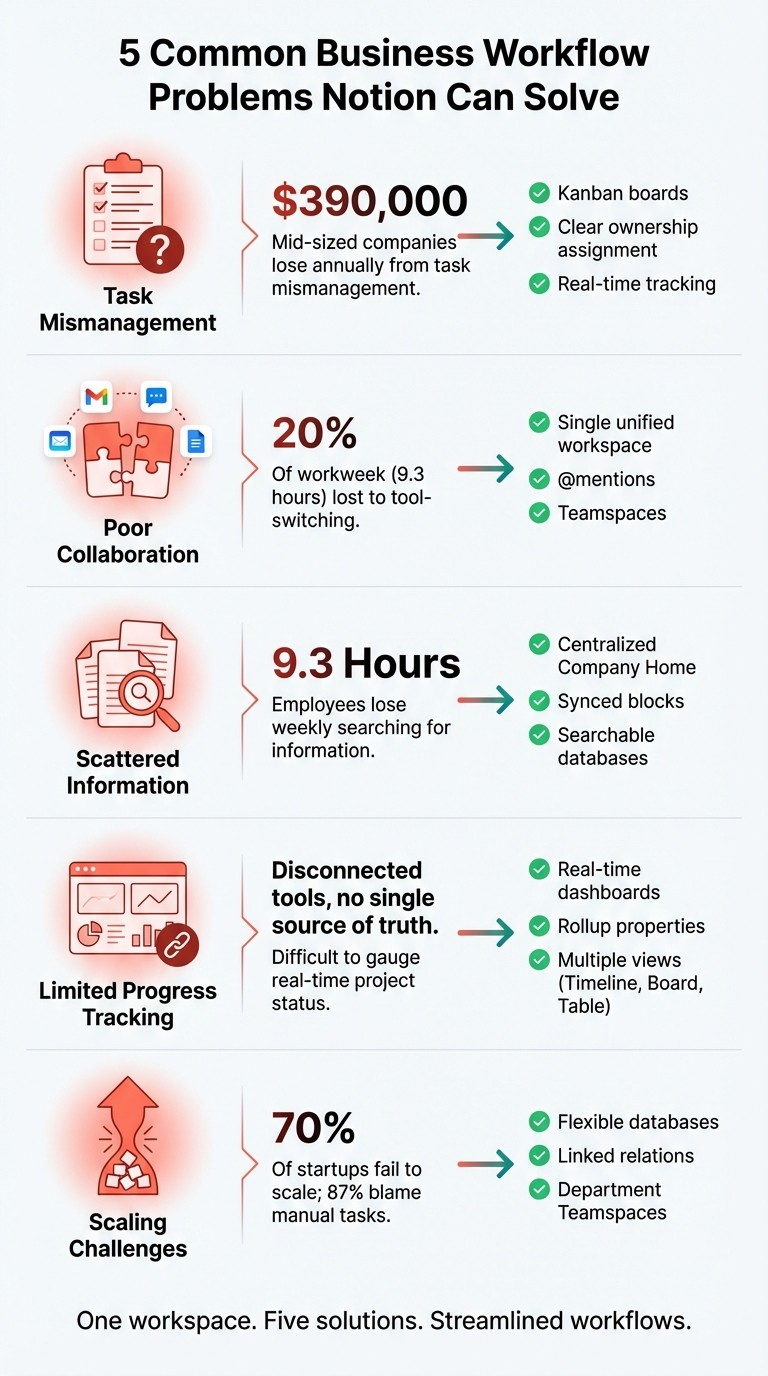
5 Business Workflow Problems Notion Solves
Problem 1: Task Mismanagement and Missing Accountability
Why Disorganized Task Management Fails
When tasks aren't assigned to specific individuals, they become "orphaned", leaving no one accountable. The fallout? Deadlines are missed, projects hit roadblocks, and team members waste time duplicating efforts. For mid-sized companies, these inefficiencies can rack up losses of about $390,000 annually.
The situation gets worse when managers rely on outdated methods like status meetings and email threads to track progress. Without real-time updates, problems often go unnoticed until it's too late. On top of that, manual data entry - while achieving 96–97% accuracy - introduces errors, especially when multiple people enter the same information into different systems. These mistakes add up quickly in both time and cost.
"Manual processes are slowing us down more each quarter", - John Turner, Head of Operations, SmartOps Ltd
How Notion Organizes Task Management
Notion transforms task management by centralizing everything in one workspace. Teams can assign clear ownership using properties like "Owner", "Responsible Team", and "Collaborator." Tools like Kanban boards, timelines, and rollup properties make it easy to track progress in real-time. These features highlight who's responsible for each task, pinpoint bottlenecks, and calculate completion percentages automatically - no need for manual updates.
"When you document a workflow, everyone on the team knows what needs to happen, when, and who's responsible." - Maggie Gowland, Marketing, Notion
By streamlining workflows, Notion ensures tasks are no longer left in limbo, and everyone stays on the same page.
Using Notion Templates for Task Management
Notion's "Projects & Tasks" template takes organization to the next level. This tool connects individual tasks to broader project goals, giving team members a clear understanding of not just what they’re doing, but why it matters.
Templates simplify recurring workflows, automatically generating tasks with pre-assigned owners and deadlines. For more complex processes - like urgent requests or bug reports - you can create buttons that handle multiple steps in one click, setting priorities and timelines instantly.
William Fong, Co-founder & CTO at Boxed, highlights the benefits:
"We have everything in one place - org structure, OKRs, everything you need to understand how the company is organized and works together. It makes a big difference."
Team members can also customize their views to focus solely on their tasks while still keeping an eye on overall team progress. This balance between individual focus and collective awareness keeps everyone aligned and productive.
Problem 2: Poor Collaboration and Scattered Communication
The Problem with Fragmented Communication
When communication is scattered across multiple platforms, it creates inefficiencies that can derail teamwork. Jumping between tools like Asana for timelines, Slack for chats, and Google Drive for documents eats up valuable time and disrupts focus. Instead of working seamlessly, employees end up juggling apps, which slows progress and hampers productivity.
This fragmentation also buries critical details - meeting notes, research findings, or key decisions - across different platforms. Employees are forced to dig through various tools for information or, worse, make decisions without the full context. This leads to delays in approvals, duplicated efforts (like multiple people handling the same help desk ticket), and overall frustration. Over time, this lack of clarity can directly impact job satisfaction.
Notion as a Single Collaboration Platform
Notion eliminates these communication silos by bringing everything into one unified workspace. It combines communication, documentation, and task management, allowing teams to collaborate seamlessly. With features like real-time feedback through comments and @mentions, Notion ensures that everyone stays on the same page.
A standout feature is Teamspaces, which gives each department its own dedicated workspace while keeping everything connected to the larger company ecosystem. This setup helps teams focus on their specific tasks while understanding how their work contributes to broader organizational goals. As Justin Goff, Product Manager at Duolingo, puts it:
"Notion is the one hub where you can bring everything together, that people from all teams feel comfortable using and adding to every day."
Connecting Information with Linked Databases
One of Notion's most powerful tools is its linked databases, which connect various pieces of information without duplication. You can tie daily tasks to overarching goals, link meeting notes to client records, or attach project timelines to technical specs - all within the same system.
Features like rollup properties take it a step further by automatically calculating metrics, such as project completion percentages based on task statuses. Teams can also filter databases to create custom views that show only their assigned work while keeping everything tied to the team-wide source of truth.
Kip Price, Director of Engineering at Codecademy, highlights this capability:
"You can get all the information you need in one Notion project page, whether you want an overview or to dive into the details."
Problem 3: Missing Centralized Information and Documentation
The Cost of Scattered Information
When essential business information is buried in emails, spread across cloud drives, or locked in spreadsheets, employees spend a significant amount of time just trying to find what they need. On average, they lose about 9.3 hours every week searching for information - approximately 20% of their workweek. This inefficiency not only wastes time but also forces teams to reinvent the wheel for new projects. Worse, relying on outdated or incorrect documents can lead to expensive errors. Without a single, reliable source of truth, communication breakdowns become more frequent, especially as companies grow rapidly.
How Notion Organizes Business Documentation
Notion addresses these issues by providing a centralized "Company Home" - a single hub where critical information like mission statements, team directories, policies, and standard operating procedures (SOPs) are neatly organized for easy access. Unlike static folder systems, Notion's dynamic databases allow you to categorize and filter complex data, such as client records, meeting notes, and process manuals. Its synced blocks feature ensures consistency across your workspace; for example, if you update company goals in one location, those changes automatically reflect everywhere else they appear. This eliminates the need to juggle multiple information sources and ensures everyone is always on the same page. Plus, it builds on the unified task management and collaboration workflows already in place.
Improving Onboarding with Centralized Records
Centralized documentation doesn’t just improve day-to-day operations - it also transforms onboarding. New hires can immediately access an onboarding hub filled with checklists, benefits information, and essential reading materials, enabling them to hit the ground running. For businesses looking to implement this approach, the Sentele HR Manager template ($79) offers a pre-designed structure for organizing employee records and onboarding workflows. With detailed setup instructions and unlimited free updates, this template helps streamline HR processes from the start. New employees can find answers on their own, reducing repetitive questions for existing staff. By centralizing documentation and simplifying onboarding, teams can also track progress in real time, making the entire process more efficient and effective.
How I Use Notion to Organize My ENTIRE Business
Problem 4: Limited Progress Tracking and Workflow Visibility
After establishing centralized documentation and facilitating smooth collaboration, the next step is ensuring effective progress tracking. This is key to aligning daily tasks with overarching strategic goals.
Why Monitoring Workflow Progress Is Challenging
For many businesses, understanding the real-time status of their projects is a constant struggle. Teams often rely on multiple platforms for planning, communication, documentation, and tracking, which disrupts focus and productivity. Jumping between tools - reviewing project requirements in one app, then updating tasks in another - creates inefficiencies and breaks concentration. When critical project details are scattered across various tools, maintaining a single, reliable source of truth becomes nearly impossible.
Another common issue is the disconnect between high-level planning and daily execution. Teams often lose sight of how their day-to-day work contributes to broader business objectives. Without clear, visual progress tracking, it’s easy for tactical tasks to feel disconnected from strategic goals. Manual status updates can feel tedious, leading to outdated project data and resistance from team members. Traditional tools like spreadsheets and static documents add to the chaos, making it hard to locate information or track progress in real time.
How Notion Solves Visibility Issues
Notion tackles these challenges by combining project management, documentation, and communication into one unified workspace. Its flexible database structure includes dynamic properties like Status, Person (to assign ownership), and Date, which automatically track and update work. Linking a tasks database to a projects database through the Relation property ensures that updates in one area are instantly reflected across the entire system.
Rollup properties take this a step further by calculating task completion and presenting progress visually - whether as rings, bars, or percentages. Notion also offers various views to suit different needs: Timeline View for schedules and dependencies, Board View with a Kanban-style layout, and Table View for detailed data overviews. With the AI Summary property, Notion AI can even generate real-time summaries of project pages, updating automatically as content changes.
"You can get all the information you need in one Notion project page, whether you want an overview or to dive into the details."Kip Price, Director of Engineering, Codecademy
These tools make it easier to connect daily tasks with larger objectives, all while keeping progress transparent and accessible.
Steps to Set Up Real-Time Tracking in Notion
To get started, create a master projects database with essential properties like Status, Date, and Person. Add a Rollup property to pull the "Done" status from a linked tasks database. This ensures the project progress bar updates automatically as team members complete tasks. Use linked views filtered by team member, along with a workload Select property, to visualize and balance task assignments.
Automate notifications via Slack or email to alert team members when a project’s status changes, minimizing the need for manual check-ins. Leverage Dependencies and Blocking properties in Timeline View to identify tasks that might be holding up progress. This setup allows everyone to see project updates, pinpoint blockers, and understand how their work aligns with company goals - all without switching between multiple tools.
Problem 5: Workflows That Don't Scale with Business Growth
Once operations are streamlined, the next hurdle many businesses face is scaling workflows to match growth. It’s a common pain point - systems that worked for a small team often crumble under the weight of expansion.
How Rigid Systems Hold You Back
As your business grows, small inefficiencies can snowball into major roadblocks. Manual processes, scattered data, and unstructured workflows become harder to manage. Studies show that about 70% of startups fail to scale successfully, with 87% of business leaders blaming manual tasks and data silos for the struggle.
Early-stage companies often rely heavily on the founder’s direct involvement. While this hands-on approach can drive initial success, it quickly becomes unsustainable as the business grows. Founders and managers turn into bottlenecks, bogged down by endless approval requests and routine decisions. On top of that, disconnected tools - like an accounting system that doesn’t sync with inventory or a project management tool that doesn’t talk to communication software - create data silos that slow down operations.
"Scaling isn't about doing more - it's about structuring for clarity so that excellence can happen without your constant supervision."Kristin Marquet, Founder & Creative Director, Marquet Media
The problem is widespread: 74% of companies lack integrated software solutions to support their scaling efforts.
How Notion Adapts to Growing Businesses
Notion offers a flexible solution to this challenge, allowing businesses to adjust workflows without overhauling their systems. Its customizable databases can evolve alongside your needs, transitioning from simple to-do lists to complex project management tools. You can easily toggle between different layouts - Table, Timeline, Board, or Chart - and create filtered views, all within the same platform.
For example, a small team’s basic client tracker can grow into a sophisticated CRM. With Notion, you can add automated workflows, custom fields, and cross-departmental visibility, ensuring your system scales with your business. This adaptability eliminates the need for rigid, outdated setups.
Notion’s database relations also enable seamless collaboration across departments. Imagine your marketing content calendar linking directly to your product roadmap or meeting notes connecting to project databases. This interconnected data system keeps everyone on the same page and adds value to your workflows.
Bringing Departments Together with Notion
Notion organizes workspaces into Teamspaces for each department, alongside a centralized "General" space. This setup gives teams the autonomy to manage their own workflows while ensuring essential data remains accessible to everyone.
"We have everything in one place - org structure, OKRs, everything you need to understand how the company is organized and works together. It makes a big difference."William Fong, Co-founder & CTO, Boxed
Real-world examples highlight how effective this approach can be. Flowwow, a global gifting marketplace, expanded to over 40 countries between 2024 and 2025 by building a custom CRM in Notion and integrating AI-powered WhatsApp bots for seller onboarding. Similarly, Proof, a marketing platform led by CEO Dave Rogenmoser, used the FACe tool to identify operational gaps - like the lack of a treasury function - and transformed from a struggling startup to a well-structured scale-up between 2019 and 2022.
Practical implementation tips include assigning Workspace Owners to handle security and billing, and Teamspace Owners to manage department-specific workflows. Linked databases further enhance collaboration. For instance, a "Submit Design Request" button in the Marketing Teamspace can automatically update the Design Team’s tracker, streamlining communication and task management.
The benefits of these strategies are clear. Companies that prioritize transparency in their data and communication often see profit margins 21% higher than average. Additionally, fostering a positive work culture can boost team productivity by up to 30%. Notion’s unified workspace supports these outcomes by making information accessible and keeping teams aligned as they scale.
Conclusion
Workflow issues are a persistent challenge, and ignoring them can come with a hefty price tag - up to 30% of annual revenue, according to some estimates. The answer isn’t adding more tools to the mix; it’s about finding a single, adaptable platform that fits seamlessly into your team's workflow.
Notion steps in as a practical solution, tackling all five major workflow challenges through its focus on centralization, customization, and scalability. By bringing projects, documentation, and communication into one unified space, it eliminates the inefficiency of jumping between disconnected tools. Plus, it ensures that everyone on the team stays aligned with the purpose behind their work. Features like real-time dashboards and progress tracking also give managers the visibility they need to identify and address bottlenecks before they escalate.
What’s more, Notion grows with your business. You can start with simple templates and gradually build out more advanced systems as your needs evolve. Its modular design ensures you’re never stuck with rigid workflows that can’t handle the demands of a growing team.
Ultimately, businesses that succeed in the long run are those that prioritize flexible systems early on. Centralizing knowledge, automating repetitive tasks, and documenting workflows aren’t just operational improvements - they’re the building blocks for sustainable growth. When your team spends less time searching for information and more time getting things done, the benefits are felt across the board. This unified approach lays the groundwork for a streamlined and scalable workflow that drives success.
FAQs
How does Notion help teams stay accountable for tasks?
Notion helps teams stay accountable by making responsibilities and progress visible to everyone. With a shared task database, you can include key properties like owner, due date, and priority, so every team member knows exactly what they need to handle. Plus, with custom views - like calendars or Kanban boards - it’s simple to keep track of tasks, spot overdue items, or identify bottlenecks.
As tasks move through stages like "In Progress" or "Done", updates are logged automatically, providing managers with a clear record of progress. This level of transparency keeps everyone aligned and cuts down on the need for constant check-ins. Features like embedded comments, @-mentions, and linked documents ensure feedback and updates are tied directly to each task, helping teams avoid miscommunication and stay organized.
How does Notion help businesses centralize their information effectively?
Notion serves as a one-stop workspace for businesses, bringing together everything from documents and databases to standard operating procedures (SOPs), client information, and project updates. By consolidating these resources, it eliminates the hassle of juggling multiple tools and ensures teams always have access to the most up-to-date policies, sales pipelines, or product details - all in one place.
With its flexible templates, Notion lets businesses build custom tools like CRMs, finance trackers, or onboarding guides, tailored to their specific needs. Its advanced search and tagging capabilities make locating information a breeze, while the integration of structured databases with rich text, media, and comments ensures everything stays well-organized and easy to use. This streamlined approach helps teams access critical data quickly, work more effectively, and stay on the same page.
How does Notion help businesses streamline and scale their workflows?
Notion empowers businesses to grow efficiently by offering a unified workspace tailored to your team’s needs. With features like team spaces, department hubs, and shared databases, you can create a structure that mirrors your organization’s hierarchy. Plus, reusable templates for tasks such as onboarding, project tracking, and standard operating procedures (SOPs) ensure consistency, making it easier to scale without unnecessary complications.
Its flexible databases let you store and organize everything in one searchable hub - whether it’s managing invoices or launching new products. This setup simplifies workflows for new hires and teams, cutting down on the learning curve and preventing duplicate efforts. Linked and automated databases make it easy to scale across departments or projects while keeping data accurate and accessible.
Notion also integrates AI tools and third-party apps to handle routine tasks, generate content, and connect with the tools your business already uses. Custom dashboards offer quick access to key metrics, while adjustable permissions ensure your workspace remains secure as your team grows. Together, these features help businesses stay productive and organized during periods of expansion.
Ritesh Nayak
Ritesh Nayak
Ritesh Nayak
Ritesh Nayak
Ritesh Nayak