
Ritesh Nayak
Notion Developer
Notion vs Trello: Best Tool for Managing Operations
•
13
When deciding between Notion and Trello for managing operations, it boils down to your team’s needs:
Notion is ideal for teams managing complex workflows, interconnected data, and documentation. Its database-driven approach lets you combine tasks, wikis, and project management in one place. However, it has a steeper learning curve and may feel overwhelming for simpler tasks.
Trello works best for teams seeking a simple, visual task tracker. Its Kanban-style boards make task management intuitive and quick to implement. While it’s user-friendly, it lacks advanced features for handling detailed workflows or large datasets.
Quick Comparison:
Feature | Notion | Trello |
|---|---|---|
Ease of Use | Moderate learning curve | Highly intuitive |
Core Structure | Databases, pages | Boards, lists, cards |
Best For | Documentation + task management | Simple task tracking |
Pricing (Entry Level) | $8/user/month | $5/user/month |
Free Plan | For individuals + 10 guests | Teams up to 10 boards |
Automation | Limited, via integrations | Built-in (Butler) |
Collaboration | Real-time editing | Card-based updates |
Scalability | Handles complex data | Best for smaller projects |
Choose Notion if you need a powerful all-in-one workspace for managing projects and documentation. Opt for Trello if you want a straightforward tool for tracking tasks visually without extra complexity.
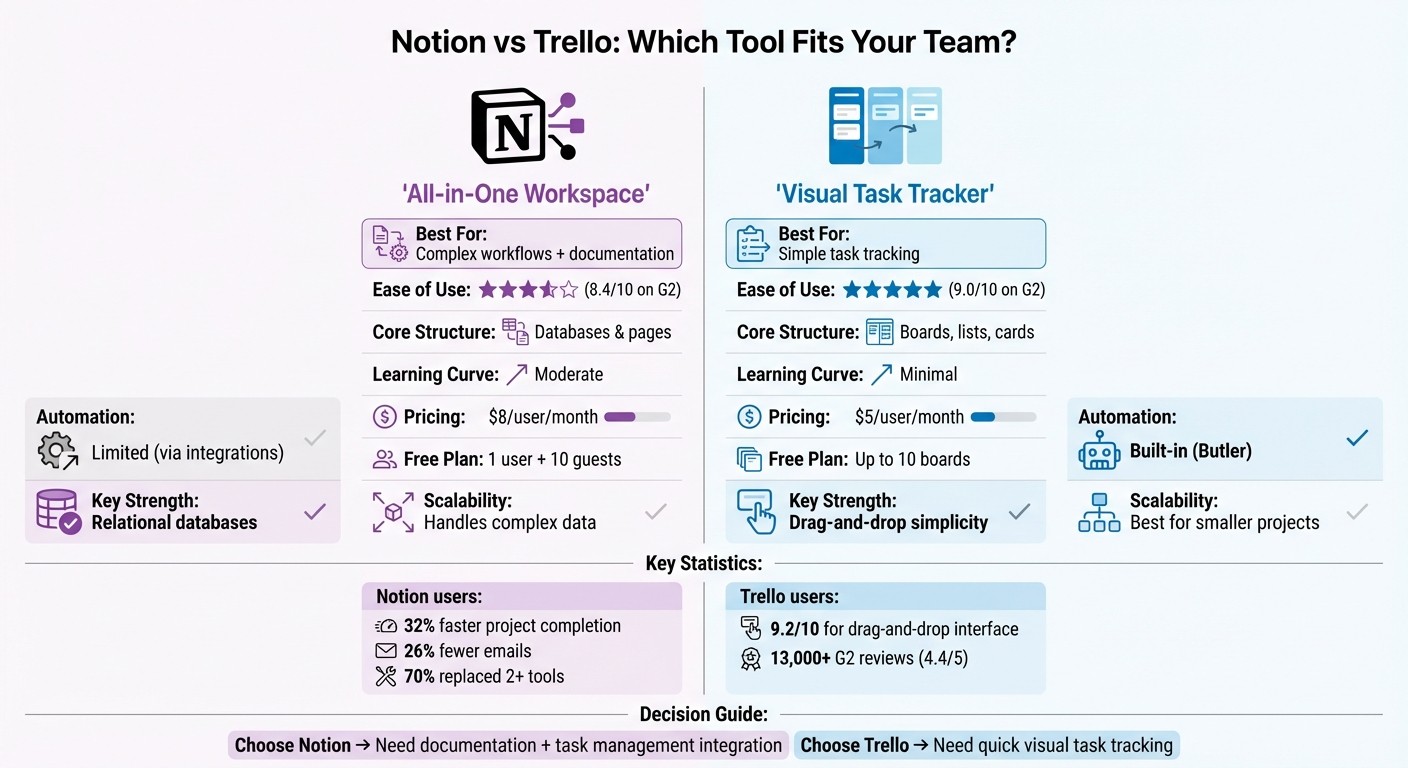
Notion vs Trello Feature Comparison Chart for Operations Management
Trello vs Notion: Which is Best for You? (App Comparison)
Notion for Operations Management
Notion stands out as an all-in-one workspace, combining documentation, databases, and task management into a single platform. By bringing everything together, it reduces silos and simplifies operations, ensuring workflows are directly tied to the necessary documentation.
One of Notion's standout features is its relational databases, which go beyond basic task management. For example, you can link a client database to projects, which then connect to individual tasks and meeting notes. This interconnected system keeps everything in context, making it easier to manage operations seamlessly.
Notion's Key Features
At the heart of Notion's operational power are its customizable databases. These allow you to add unlimited metadata to tasks - like tags, dates, formulas, or custom properties - and then organize the data with filters and sorting options tailored to your needs. Another standout feature is synced blocks, which automatically update content across multiple pages. This is especially useful for keeping SOPs or project headers consistent.
Collaboration is another strength. With tools like @mentions, shared comments, and real-time editing, teams can work together directly within the platform. Notion also offers detailed permission controls, letting you decide who can access specific pages, databases, or even the entire workspace. And if you're looking to get started quickly, there are over 5,000 community-built templates available to help you hit the ground running.
Notion's Strengths
One of Notion's biggest advantages is its adaptability. You can shape it to fit nearly any operational structure.
Justin Watt, Director of Ops & Marketing at MetaLab, shared: "We got rid of nearly a dozen other tools because of what Notion does for us".
The results speak for themselves. Teams using Notion report completing projects 32% faster and cutting down emails by 26%. In fact, 70% of users have replaced two or more tools with Notion.
Another key strength is how well Notion handles complexity. Instead of becoming harder to manage as you add data and connections, the system grows more efficient. By centralizing everything - company handbooks, client details, and active tasks - into one searchable space, your team spends less time digging through scattered tools for information.
Notion's Limitations
That said, Notion isn't without its challenges. The learning curve can be steep. For instance, while Trello scores 9.0/10 for ease of use on G2, Notion comes in slightly lower at 8.4/10.
As one verified Capterra user put it: "Notion is Trello and Confluence combined. It solves a lot of problems and can act as the source of information for a company. It requires a guru to setup and successfully maintain".
Another potential downside is over-customization. Without a clear structure, teams can end up creating fragmented or overly complicated systems. Performance can also take a hit when working with very large databases. Lastly, operations teams needing advanced task dependency management, like Gantt charts, might find Notion lacking in this area.
Trello for Operations Management
Trello stands out as a straightforward, visually-driven tool for managing tasks, making it a great fit for teams looking for simplicity. Its design revolves around Kanban-style boards, where workflows are broken into lists representing different stages. Tasks are displayed as cards that move across the board - from "To Do" to "In Progress" to "Done" - giving teams a clear, real-time view of their progress.
This setup works well for operations teams that need a transparent way to track the steps involved in delivering a product or service. Each task card consolidates essential details like descriptions, assignees, deadlines, checklists, and attachments. The drag-and-drop functionality makes updating tasks intuitive and seamless.
One of Trello’s standout features for operations is its ability to prevent bottlenecks. By setting Work in Progress (WIP) limits on lists, teams can control how many tasks are in a particular stage at any given time. If a list reaches its capacity, the platform flags it visually, making it easy to identify problem areas. Trello also supports a "pull system", where team members pick up tasks only when they have the bandwidth, ensuring smoother workflows.
Now, let’s dive into the features that make Trello such a valuable tool for operations management.
Trello's Key Features
At its core, Trello relies on boards, lists, and cards to organize tasks. But it offers much more than basic task tracking. For instance, the Butler automation tool can handle repetitive tasks like moving cards when checklists are completed or sending reminders for deadlines. This saves time and reduces manual effort.
Trello also integrates with over 200 third-party tools - called Power-Ups - allowing seamless connections to platforms like Slack, Google Drive, and Jira. For teams that need multiple ways to view their work, paid plans offer additional perspectives, including Timeline, Calendar, Dashboard, Table, and Map views. While Trello doesn’t have a built-in priority field in all views, color-coded labels can help teams define task urgency, such as Emergency, Standard, or Non-Urgent.
These features contribute to Trello’s reputation for being intuitive and user-friendly.
Trello's Strengths
One of Trello's biggest strengths is its ease of use. On G2, it scores 9.0 out of 10 for usability and 9.1 out of 10 for setup, with users particularly praising its drag-and-drop interface, which scores 9.2 out of 10. This means teams can start using it right away, without needing extensive training.
Mohamed W., Founder and CTO, shared: "Its user-friendliness enabled us to work together with our team members and complete our tasks efficiently".
With over 13,000 users rating it 4.4 out of 5 on G2, Trello is a proven choice for teams prioritizing simple task management over complex systems. Its free plan is also generous, offering unlimited cards and Power-Ups, with up to 10 boards per workspace.
Trello's Limitations
While Trello shines in visual task management, it has its limits when it comes to handling complex operations. The platform doesn’t support hierarchical structures, such as sub-pages or advanced relational databases, which tools like Notion excel at. For teams managing intricate workflows or dependencies, Trello might not be the best fit.
Appvizer Magazine notes: "Trello is the digital whiteboard for modern teams... designed for tracking tasks on a daily basis".
This simplicity means Trello isn’t equipped to manage deeply interconnected projects. Features like Gantt charts, resource tracking, and advanced reporting require Power-Ups, which can increase both complexity and costs. Additionally, when boards become overloaded with too many cards, performance can degrade. For operations teams that need to link extensive data sources or maintain detailed documentation alongside tasks, Trello’s linear structure may feel restrictive.
Feature Comparison
When it comes to task management, Trello and Notion take distinctly different paths. Trello operates with a card-based system where tasks are represented as cards. Team members are assigned directly to these cards, and due dates come with automated reminders to keep everyone on track. On the flip side, Notion uses a database-driven approach, assigning tasks via Person fields. This allows for multiple people to be assigned to a single task, which is handy for collaborative efforts. Progress tracking also varies: Trello moves cards across lists to show task status, while Notion uses Status properties combined with rollups to indicate completion. Each platform tailors its task management tools to fit different operational styles.
Workflow customization is another area where the two platforms diverge. Notion is built for flexibility, offering modular blocks that can be combined into relational databases, rollups, and formulas. This creates highly interconnected systems, which many users praise for their adaptability. Trello, on the other hand, keeps things straightforward. It relies on Power-Ups, custom fields, and board backgrounds to personalize workflows. For instance, if you need to link a client database to project tasks, Notion can handle this internally. Trello, however, would require third-party Power-Ups to achieve the same result.
Automation also plays a role in how these platforms support users. Trello’s Butler feature automates tasks like moving cards or sending reminders through a rule-based system. Notion offers basic automation capabilities, such as recurring tasks, but often leans on third-party tools like Zapier to extend its functionality.
When it comes to collaboration, the platforms take slightly different approaches. Notion allows real-time co-editing, letting multiple users work on the same page simultaneously. This feature has reportedly helped teams using Notion cut down on emails by 26%. Trello, in contrast, focuses on card-based collaboration, providing immediate notifications for mentions or updates. While Notion’s aggregated email updates help streamline communication, they may not always deliver the immediacy needed for quick responses.
Finally, scalability is where the platforms show their strengths and limitations. For managing complex or growing datasets, Notion shines with its support for wikis, nested pages, and relational databases. However, performance can take a hit when databases grow too large. Trello’s visual boards, while excellent for quick deployment, may become cluttered and harder to manage as projects scale. In essence, Trello is ideal for teams seeking simplicity and speed, while Notion’s more intricate structures are better suited for handling vast amounts of data.
Pricing Comparison
When selecting an operations management tool, cost is just as important as functionality.
Trello's Standard plan is priced at $5 per user per month (billed annually), while Notion's Plus plan starts at $8 per user per month. For advanced features like additional views and unlimited automation, Trello's Premium plan costs $10 per user per month.
The free plans for both platforms cater to different needs. Trello's free plan supports collaborative teams, allowing up to 10 collaborators on 10 boards with unlimited cards. Notion's free plan, on the other hand, is more suitable for individual use, offering access for one user plus 10 guests, along with unlimited pages and blocks. There are also differences in file upload limits: Trello allows uploads up to 10 MB per file, while Notion caps uploads at 5 MB. Notably, Trello includes 250 automation runs per month in its free plan via the Butler tool, whereas Notion does not include native automation in its free version.
Plan Tier | Trello (Annual) | Notion (Annual) |
|---|---|---|
Free | $0 (10 boards; 10 collaborators) | $0 (1 user + 10 guests) |
Entry Paid | $5/user/month (unlimited boards) | $8/user/month (unlimited blocks) |
Mid-Tier | $10/user/month (all views; unlimited automation) | $15/user/month (private teamspaces; 90-day history) |
Enterprise | $17.50/user/month (for teams of 50+ users) | Custom pricing |
Notion's Business plan, priced at $15 per user per month, includes private teamspaces, 90-day page history, and support for up to 250 guests. In comparison, Trello's Premium plan at $10 per user per month offers features like Dashboard, Timeline, and Calendar views, along with unlimited automation. For enterprise needs, Trello charges $17.50 per user per month for teams of 50 or more, while Notion provides custom pricing for its Enterprise plan, which includes features like SCIM provisioning and audit logs.
A noteworthy cost factor is Notion AI, available as an add-on for $8 per user per month. This feature provides AI-driven content generation and enhanced search capabilities, potentially increasing overall costs for teams that need these tools. Trello does not have an equivalent AI feature, which keeps its pricing simpler.
Use Cases: Notion vs Trello
When to Use Notion
Notion is the go-to choice for tasks that require detailed documentation paired with integrated project management. If you're creating a company wiki, managing Standard Operating Procedures (SOPs), or handling interconnected data across teams, Notion’s relational databases and hierarchical page setup can meet those needs seamlessly.
Many users have found Notion to be a time-saver and an effective tool consolidator. Justin Watt, Director of Ops & Marketing at MetaLab, shared:
"We got rid of nearly a dozen other tools because of what Notion does for us".
One of Notion’s standout features is its ability to link various data types. For instance, you can connect client databases with projects, tasks, and meeting notes, all within one centralized platform. This setup eliminates information silos and ensures everything stays relevant and accessible. Teams using Notion have reported 32% faster project completion and a 26% drop in email volume.
If your workflow requires a centralized knowledge hub that combines documentation and task management, Notion is a strong choice - especially for product roadmaps, CRMs, and editorial planning. However, if your team prioritizes speed and a visually simple interface, Trello might be a better fit.
When to Use Trello
Trello shines in environments where quick task tracking is essential. Its straightforward, visual Kanban-style boards make it ideal for fast-moving projects like marketing campaigns, agile development sprints, customer support ticketing, and content approval workflows.
Neil Max N., an analyst, highlighted Trello’s simplicity:
"Trello's best feature is its ability to simplify task and project management. The Kanban-style dashboard interface is highly visual and allows you to organize tasks into custom columns".
Trello also features a built-in Butler automation tool that streamlines repetitive workflows without requiring extra integrations. Choose Trello when your team needs an easy-to-use platform for tracking tasks, providing clear status updates, and getting started quickly. It’s a great option for teams that value speed and simplicity over managing complex data relationships.
Which Tool to Choose
After diving into the features and pricing, it’s clear that the right tool depends heavily on how your team works and how much time you can dedicate to setup and training.
If your team handles extensive documentation, interconnected workflows, and wants to consolidate multiple tools into one, Notion might be your best bet. A whopping 98% of Notion users report saving time, and 70% have replaced two or more tools by switching to it. This makes it especially appealing for medium to large teams managing product roadmaps, internal wikis, or intricate databases.
On the flip side, if your team needs a tool that’s simple, fast, and intuitive for task tracking, Trello is the way to go. Its visual Kanban boards are perfect for straightforward workflows like marketing campaigns or agile sprints, offering clarity without a steep learning curve. While 69.9% of Notion’s reviews come from small businesses, Trello sees stronger adoption among enterprises, with 15.4% of reviews from enterprise users, compared to Notion’s 5.4%. For large teams managing hundreds of users, Trello Enterprise provides centralized admin controls and an organization-level dashboard for streamlined governance.
Final Recommendations
Pick Notion if you’re looking for a customizable, all-in-one workspace that integrates documentation with task management. It’s great for teams ready to invest time upfront for deeper integration.
Go with Trello if you need a straightforward, visually driven task management tool that gets your team up and running in minutes with minimal training.
Both tools are excellent for managing operations, but they cater to different needs and team dynamics.
FAQs
What’s the key difference between Notion and Trello for managing tasks?
Notion and Trello are both popular tools for managing tasks, but they approach the job quite differently. Trello focuses on simplicity with its Kanban board system. You create cards, move them between lists, and visually track progress. It’s straightforward, user-friendly, and works well for quick, uncomplicated task management.
Notion, however, is a more versatile platform that combines task management with comprehensive documentation. You can organize tasks in formats like tables, calendars, or Kanban boards, and each task can include detailed elements such as text, images, checklists, or links to other pages. This flexibility makes Notion ideal for building custom workflows and connecting tasks to broader project details.
In essence, Trello shines for its ease and visual clarity in task tracking, while Notion offers a more customizable, all-in-one workspace for managing tasks and additional resources.
What’s the pricing difference between Notion and Trello for small teams?
Notion provides a Free plan that supports unlimited members, making it an excellent option for teams to collaborate without spending a dime. For small teams needing more advanced features, the Plus plan is priced at $10 per member per month, with a reduced rate available for those who opt for annual billing.
On the other hand, specific pricing details for Trello aren't included here, so a direct comparison isn't possible. That said, Notion’s pricing is straightforward and designed to cater well to the needs of smaller teams.
Which tool is better for managing complex workflows: Notion or Trello?
When it comes to handling complex workflows, Notion often stands out as the stronger option. Its database-driven structure offers the flexibility to design workflows that align perfectly with your needs. Features like templates, relational databases, and its block-based interface make Notion well-suited for managing detailed, multi-step processes.
Meanwhile, Trello shines in its simplicity, relying on a visual Kanban board system for task tracking. It’s an excellent tool for straightforward task management but doesn’t offer the same level of customization or depth as Notion. For operations that demand intricate processes and advanced tailoring, Notion is likely the better choice.
Ritesh Nayak
Ritesh Nayak
Ritesh Nayak
Ritesh Nayak
Ritesh Nayak