
Ritesh Nayak
Notion Developer
7 Ways Notion Templates Improve Team Productivity
•
17
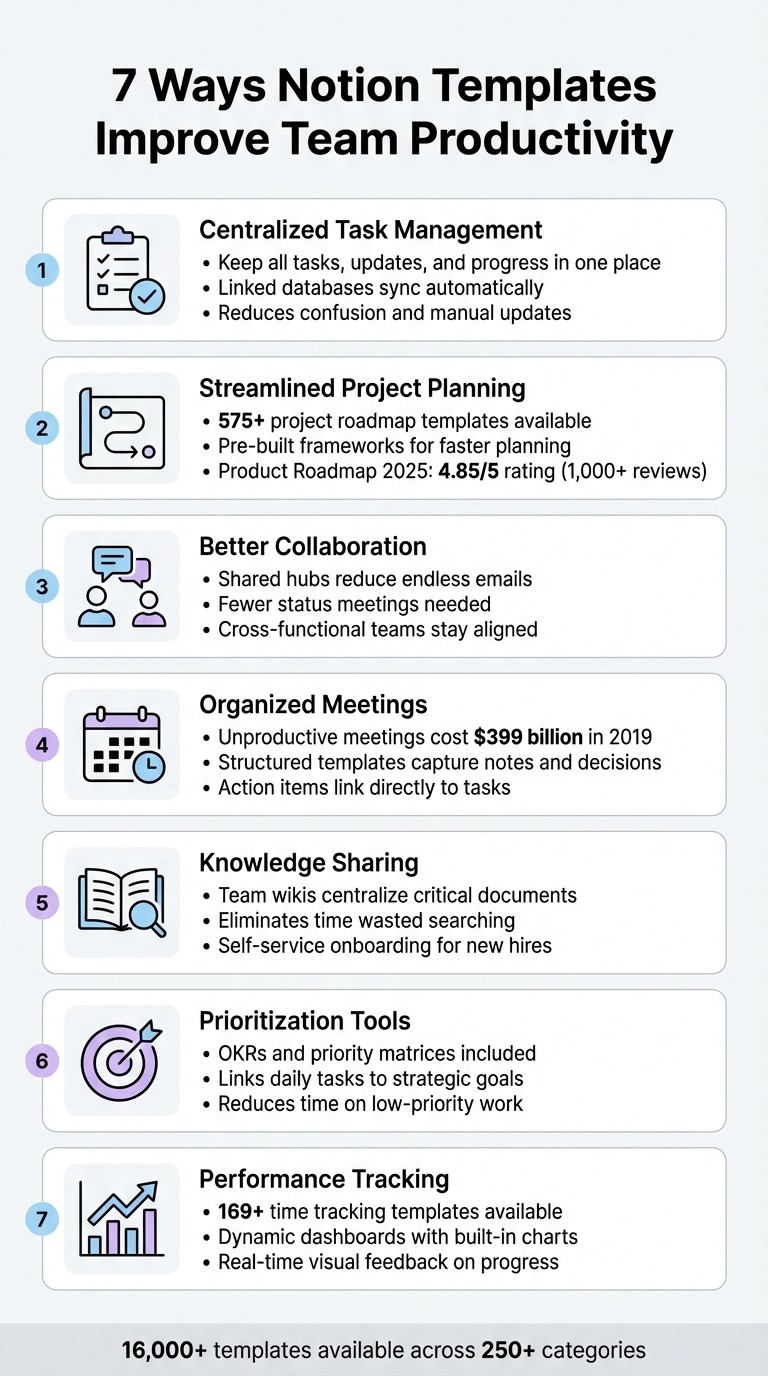
Notion templates are a powerful way to simplify team workflows and save time. They eliminate the hassle of starting from scratch, centralize information, and help teams focus on execution. Here's how they enhance productivity:
Centralized Task Management: Keep all tasks, updates, and progress in one place, reducing confusion and manual updates.
Streamlined Project Planning: Use pre-built roadmaps and frameworks to plan projects faster and align teams.
Better Collaboration: Create shared hubs for communication, reducing endless emails and status meetings.
Organized Meetings: Use structured meeting templates to capture notes, track decisions, and assign action items.
Knowledge Sharing: Build team wikis to store and access critical documents without wasting time searching.
Prioritization Tools: Decision frameworks like OKRs and priority matrices help teams focus on what matters most.
Performance Tracking: Monitor KPIs and track time with dynamic dashboards for better goal alignment.
With over 16,000 templates available, Notion offers solutions for almost every workflow. Start with a template that addresses your biggest challenge, customize it for your team, and see the difference in productivity.
7 Ways Notion Templates Boost Team Productivity
1. Centralize Task Management and Tracking
Tackling Team Challenges with a Unified Approach
When tasks are scattered across emails, chats, and spreadsheets, it’s easy for chaos to creep in. Notion templates solve this problem by using linked databases that sync automatically. For example, when you mark a task as complete in the task database, the overall project progress updates instantly - no need for manual edits or duplicate entries. This interconnected system not only gives leadership a bird’s-eye view of all projects but also allows team members to zero in on specific details during daily standups.
The "Projects & Tasks" template connects two databases, tying individual task owners to broader project milestones. This streamlined setup simplifies daily operations and keeps everyone aligned.
Boosting Workflow Efficiency
Centralizing task management doesn’t just save time - it transforms how teams operate. With fewer repetitive status meetings and less time spent hunting for documents, teams can focus on what really matters. Matt Piccolella, Product Lead at Notion, highlights this benefit:
"When your team can easily see the big picture, like the docs that are related to projects or the tasks that roll up to a goal, it connects an individual's work with your team's larger efforts."
Custom dashboards make this even easier. Teams can design views that include progress bars, color-coded status tags, and percentage trackers, giving instant feedback on project status.
Bringing Everything Together in One Place
Notion’s flexibility takes efficiency to the next level by making it simple to switch between different data views. Whether you prefer a Kanban board to track workflow stages, a timeline (Gantt chart) for capacity planning, or a calendar to monitor deadlines, Notion templates let you customize how you visualize your work - all within a single system. With access to over 7,611 project and task templates, teams can hit the ground running.
For an even more centralized experience, the "Team Home" template bundles your mission, goals, and active projects onto one page. This acts as an internal hub where cross-functional partners can quickly find the information they need.
2. Streamline Project Planning and Roadmaps
Practical Solutions for Team Challenges
Starting a project roadmap from scratch can eat up valuable time. Notion templates help cut through that hassle by offering pre-built frameworks that guide teams through every phase of planning. With over 575 project roadmap templates available in the Notion Marketplace, your team can skip the tedious setup and dive straight into execution. Take the "Product Roadmap 2025" template, for example - it boasts a 4.85/5 rating from over 1,000 user reviews. Packed with timeline views and Kanban boards, it allows teams to easily visualize phases, milestones, and deadlines. Plus, it’s designed to adapt seamlessly into a custom solution for any industry.
Customization for Any Team or Workflow
Notion templates don’t just save time - they’re built to adapt. Whether your team uses Agile, Waterfall, or a hybrid approach, the modular components in these templates can be reconfigured to match your needs as they evolve. You can create custom filters to track progress by quarter, year, owner, or priority. Relation properties make it easy to link roadmaps directly to tasks, objectives, and meeting notes. This flexibility means a marketing team’s editorial calendar and a software team’s sprint plan can both thrive using the same core system.
Boosting Workflow Efficiency
These roadmap tools don’t just streamline planning - they make keeping everything up-to-date a breeze. Auto-updating progress bars eliminate the need for manual updates, saving time and reducing errors. Teams can switch effortlessly between different views, like Gantt charts for capacity planning, Kanban boards for daily standups, and calendar views for tracking deadlines - all within a single template.
Centralizing Key Information
Roadmap templates act as a central hub for everything your team needs - project briefs, technical specs, design documents, and more. By keeping all this information in one place, teams can avoid the distractions of constant context-switching. Instead, everyone stays aligned and focused on what’s most important. This consolidation ensures that critical details are always within reach, keeping the entire team on the same page.
3. Improve Team Collaboration and Communication
Tackling Team Challenges Head-On
Communication breakdowns can waste hours of valuable time every week. Notion templates offer a solution by creating centralized communication hubs where team members can quickly find essential information without digging through endless emails or chat threads. Take the "Team Home" template, for example - it combines mission statements, contacts, and updates in one place, cutting down on status meetings and making communication more efficient. As Matt Piccolella, Product Lead at Notion, puts it:
Your team home page is a way to answer questions in one place without having to constantly connect the dots.
In March 2023, Piccolella introduced the "Product Team OS" template, which integrates multiple databases - like product roadmaps, tasks, OKRs, and documentation - into a single platform. This streamlined approach allowed cross-functional teams to access key goals and documents without constantly needing to ping the product team. It also ensured a smooth connection between big-picture strategies and day-to-day tasks.
Boosting Workflow Efficiency
Notion templates link databases to align individual tasks with company-wide goals. When a team member views a task, they can immediately access related project briefs, meeting notes, and other supporting documents that explain the purpose of their work. This setup eliminates the time wasted switching between tools or hunting for context. Plus, teams can organize their workflows using layouts like Kanban boards, Gantt charts, or calendars to match their preferred style.
Keeping Information Centralized and Accessible
Meeting templates with decision logs make it easy for both new and experienced team members to understand project directions. Instead of relying on informal handoffs or interrupting colleagues for explanations, everyone has access to a complete record of past discussions and decisions. This level of transparency is especially helpful for remote teams working across different time zones, ensuring nothing gets lost in scattered conversations.
With communication running smoothly, the next step is organizing meetings and agendas to keep the team moving forward.
4. Organize Meeting and Agenda Management
Tackling Team Challenges Head-On
Unproductive meetings are more than just a nuisance - they're a massive financial drain. In 2019 alone, they cost American businesses over $399 billion. A big part of the problem? Poor preparation. In fact, 78% of managers still rely on outdated, non-collaborative methods to keep notes. This is where Notion templates step in, offering a centralized "Meeting Notes" database that acts as a go-to archive for all discussions. Nate Martins from Notion's marketing team puts it perfectly:
"The crux of an effective meeting is a template that sees around all the corners. It provides resources. It prepares attendees. It sets structure, so you and your team can worry less about all the things they require from a meeting and more about the great ideas that'll come from it."
This structured approach isn't one-size-fits-all - it adapts to the unique needs of different industries.
Customization for Every Team’s Needs
Notion's meeting templates are designed to meet the specific demands of diverse teams. For instance, product teams can use sprint planning templates equipped with velocity metrics, while sales teams can benefit from client sync templates that track customer sentiment and feature requests. Each template includes essential properties like date, attendees, meeting type, and objectives. They can also be customized with sections tailored to specific industries, such as "Design Critiques" for creative teams or "Technical Specs" for engineering. Built-in prompts, such as "What are the potential blockers?" guide note-takers to focus on capturing critical details. This flexibility ensures that every team - no matter their function - has a streamlined system for managing meetings.
Boosting Workflow Efficiency
Recurring meetings, like 1:1s or daily stand-ups, can feel like a chore to set up repeatedly. Notion’s database templates solve this by offering pre-defined structures that save time. Action items discussed during meetings can be directly linked to project tasks, turning decisions into actionable steps instantly. Assign a note-taker, and with the help of Notion AI, you can even generate real-time summaries of the discussion.
Bringing Everything Together in One Place
With Notion, teams can quickly filter and view meetings by type, priority, or attendee, making it easy to find exactly what they need. Templates allow you to embed meeting recordings, PDFs, design files, and more, creating a searchable archive that simplifies onboarding and provides a reliable reference point. This centralized system not only saves time but also ensures that no vital information slips through the cracks.
5. Build Knowledge Sharing and Team Wikis
Solving Common Team Challenges
When documents are scattered across multiple platforms, it slows down decision-making and wastes valuable time. Misplaced guides, feedback, or policies can turn simple tasks into unnecessary scavenger hunts. Notion templates offer a solution by transforming your workspace into a centralized hub - a "campfire" where all critical documents come together. This setup eliminates the hassle of searching for information, ensuring that everything you need is in one easily accessible place.
"A wiki might be the single most high-leverage resource for your product team because it's the place where all your most important documents converge." - Notion Guide
Using database templates also ensures consistency in repetitive documentation. Whether it’s bug reports, project specifications, or user research summaries, these templates create a standardized structure, reducing the risk of missing key details. This unified approach provides a strong foundation for creating documentation tailored to your team’s unique needs.
Customization for Any Industry
Notion’s adaptability allows teams to design wikis that fit their specific workflows. For instance, engineering teams can embed GitHub gists directly into their documentation, while design teams might integrate Figma files to streamline their work. Marketing teams could set up gallery views for employee directories, making it easier for remote workers to match names with faces. Additionally, the /page command enables you to organize sub-pages under categories like "Team Directory", "Benefits", or "User Research", creating a clear and intuitive structure. This flexibility ensures that the wiki becomes a secure, accessible resource for everyone on the team.
Centralizing Information for Easy Access
Once your wiki is up and running, features like "Page Lock" help secure content while keeping it accessible to those who need it. The "Page Verification" feature adds another layer of reliability by assigning owners to review and update content regularly. The Quick Find tool (Cmd/Ctrl + P) makes retrieving information fast and effortless. For new hires, this centralized system acts as a self-service guide, allowing them to explore company history and processes independently, reducing onboarding time and boosting confidence.
6. Support Better Prioritization with Decision Frameworks
Practicality in Addressing Team Challenges
When teams struggle to prioritize, progress often stalls. Notion templates tackle this issue by embedding decision frameworks directly into workflows. For example, the Eisenhower Priority Matrix template helps categorize tasks by urgency and importance, while Cost-Benefit Analysis templates simplify evaluating pros and cons, displaying costs and ROI to assess project value. These tools cut through indecision and direct focus toward high-impact tasks.
OKR-driven templates add another layer by ranking projects based on their contribution to ambitious, time-sensitive goals. By linking daily tasks to broader objectives using relation properties, every piece of work gains a clear purpose and priority level. As Matt Piccolella, Product Lead at Notion, puts it:
When your team can easily see the big picture, like the docs that are related to projects or the tasks that roll up to a goal, it connects an individual's work with your team's larger efforts.
This structured method not only clarifies what matters most but also sets the foundation for smoother progress tracking.
Impact on Workflow Efficiency
Pre-built frameworks take the guesswork out of prioritization, eliminating the "blank-page anxiety" of starting workflows from scratch. Instead of wasting time debating priorities in endless meetings, teams can rely on dynamic dashboards for instant visual feedback on goal progress, helping them adjust priorities as needed.
Agile and Scrum templates are particularly useful for breaking down large projects into smaller, actionable tasks and organizing them into sprints. Meanwhile, roadmap templates - featuring Gantt charts or timelines - offer a clear view of task dependencies, helping teams anticipate and avoid bottlenecks. Color-coded tagging further enhances visibility, giving teams a quick snapshot of project statuses and identifying potential blockers.
Ability to Centralize and Consolidate Information
Beyond improving execution, these tools help centralize key information. Tasks can be directly tied to strategic documents like PRDs and decision logs, ensuring that the reasoning behind a project remains front and center. This minimizes time wasted on low-priority work. Creating a centralized "Team Home" page - complete with mission statements, vision, and metrics - serves as a self-serve hub for answering essential questions like "What are we doing, and why?" without the need for constant meetings. By reducing context-switching, these tools keep everyone aligned and focused on the tasks that truly matter.
7. Track Time and Performance Metrics
Practicality in Addressing Team Challenges
Beyond managing tasks and fostering collaboration, keeping tabs on performance is crucial for ensuring smooth operations and achieving goals.
Without the right tools, tracking performance often devolves into a mess of scattered spreadsheets and guesswork. Notion templates simplify this process by centralizing key performance indicators (KPIs). Teams can define metrics, assign responsibilities, and monitor progress all in one place. For example, Objectives and Key Results (OKRs) templates come with dynamic dashboards that include built-in charts, offering instant visual updates on goal progress. Drew Evans from Notion's marketing team highlights this feature:
The built-in charts give you instant visual feedback on how things are moving along, making it easy to spot where you might need to course correct or provide extra support.
For time tracking, Notion provides templates that allow team members to start and stop timers by project, client, or task - completely eliminating the need for manual data entry. The Notion Marketplace offers over 169 specialized templates for time tracking, catering to use cases like freelance projects or agency workflows.
Ease of Customization for Diverse Industries
Notion's templates are designed to adapt to the unique needs of various industries, including software development, marketing, construction, and education. For instance, a construction team might track equipment usage hours and monitor safety compliance, while individual team members can create private dashboards using "linked views." These linked views allow users to filter for their specific tasks and deadlines while staying in sync with the larger team tracker.
Impact on Workflow Efficiency
This level of customization doesn't just make templates more user-friendly - it also leads to tangible improvements in workflow.
Take Tatem's CEO Chris LaFerla, for example. In August 2022, he used centralized dashboards to track detailed sales goals, cutting down the need for frequent status meetings. Similarly, Planful consolidated its tools into a single Notion workspace between 2024 and 2025, achieving a 90% weekly active usage rate and slashing onboarding time by 50%. Under the guidance of Rebecca McRoberts (VP of Employee Success & Business Operations) and Melissa Dreuth (Chief Customer & People Officer), Planful integrated OKR tracking and centralized wikis. Emily McDowell, who leads the GTM Enablement team, leveraged Notion AI to summarize sales notes, enabling the team to produce handoff documentation four times faster. As Grant Halloran, CEO of Planful, put it:
In 27 years as a software exec, I've never seen such incredible adoption of a product as we've had with Notion at Planful. Not just wide adoption but enthusiastic adoption.
These efficiency gains highlight how centralized tools can lead to better, data-driven decision-making.
Ability to Centralize and Consolidate Information
Time tracking dashboards integrate seamlessly with other central dashboards, creating a cohesive system for tracking and decision-making. Features like clear charts and rollup properties make it easier to stay proactive and strategic. For example, rollup properties can automatically calculate project completion percentages based on the number of tasks marked as "Done." Meanwhile, Notion AI's autofill properties can summarize database entries or extract key insights from performance reports, saving time and effort.
How to EASILY Use Notion with Your Team
Examples and Use Cases
Notion templates have proven to be game-changers for tackling productivity challenges, transforming them into smooth, efficient workflows.
Take marketing teams, for instance. John Hurley, the Head of Product Marketing at Notion, relies on the Product Launch Roadmap template to keep cross-functional teams on the same page during go-to-market efforts. This template includes features like milestone tracking, cross-functional tagging, and AI Autofill for status updates, making the launch process much more manageable. As Hurley puts it:
Our template helps us think through all the critical elements of the launch and gives our cross‐functional partners a consistent structure to work within.
Another example comes from Alex Hao, Social Media Lead at Notion, who uses the Social Media Calendar template. This template includes a built-in request form that consolidates all incoming submissions into one place. No more juggling between Slack, email, and in-person requests. Hao explains:
Instead of trying to coordinate our social calendar between Slack, email, and in-person requests, everyone can submit their asks here. It's so much easier to manage and plan our social calendar.
For HR teams, meeting agenda templates have become essential for standardizing processes like candidate reviews and onboarding syncs. These templates include all the essentials: date and time, participant lists, clear objectives, discussion notes, and tagged action items. By providing this structure, they help ensure important decisions are captured while saving valuable time in meetings.
Project management teams also reap the rewards of Notion's templates. The Projects & Tasks template, which boasts a 4.85/5 rating from over 7,000 users, is particularly popular. It connects two databases to automatically update overall project progress, and teams can create private dashboards with linked views to see only their assigned tasks in real time. Users praise it for being "awesome for multi-project management" and love how it brings instant structure to their workflows.
Conclusion
Notion templates take the stress out of starting from scratch and make managing work much smoother. With a solid structure already in place, dealing with chaotic workflows and juggling tasks becomes far more manageable.
What makes these templates stand out is their ability to connect individual tasks to broader projects and company objectives. This connection helps everyone see how their contributions fit into the bigger picture, cutting down on unnecessary status meetings and keeping teams on the same page. By turning scattered efforts into a well-organized, goal-oriented workflow, these templates boost both clarity and efficiency.
On top of that, these templates are incredibly flexible. You can tweak them to suit your team’s specific needs - add custom status updates, change colors and icons, or remove tags that don’t apply. Start with a template that addresses your most immediate need, whether it’s tracking tasks, planning projects, or organizing meeting notes. Test it out with your team, collect feedback, and refine it over time. This process ensures your tools evolve alongside your team’s goals, driving productivity even further.
Drew Evans from Notion’s marketing team puts it perfectly:
The best part about templates is they're just a starting point, a way to skip past the blank-page anxiety and get to the real work faster.
With over 16,455 templates spanning 250+ categories in Notion’s template gallery, there’s something for virtually every workflow. And if you don’t find exactly what you need, you can always create a custom solution from the ground up. Start with a template that solves your most pressing challenge, gather input from your team, and refine it as you grow together.
FAQs
How can teams customize Notion templates to fit their workflows?
Notion templates offer a lot of flexibility, making it easy for teams to adapt them to their workflows. You can tweak fields like text, numbers, dates, or priority levels to better match your process. For instance, you might include budget columns formatted in U.S. dollars, add client-specific tags, or customize task priorities to suit your team’s approach.
What’s more, each database entry in a Notion template acts as a fully customizable page. This means you can embed files, attach AI-generated summaries, or create custom sections without altering the overall structure. Templates can also work together seamlessly. For example, linking a meeting notes template to a project plan allows all related discussions to automatically show up in the corresponding project record. By adjusting, reorganizing, or combining these elements, teams from different departments can build workflows that meet their specific needs while ensuring consistency across the board.
How can Notion templates help streamline meeting management?
Notion templates for managing meetings take the chaos out of discussions and turn them into well-organized, searchable records. With a pre-designed template, you can keep everything consistent by neatly arranging agenda items, decisions, and action points in one place - ensuring nothing slips through the cracks. This approach keeps the entire team on the same page and makes follow-ups a breeze by automatically capturing essential tasks.
These templates also allow for real-time collaboration, enabling team members to update notes as the meeting unfolds. Plus, with Notion’s AI features, you can get summaries of discussions, highlight key points, and even convert them into actionable to-dos - all while saving time and avoiding misunderstandings. By centralizing information and streamlining workflows, teams not only cut down on prep time but also ensure that crucial details are always within reach.
How can Notion templates help teams collaborate and communicate more effectively?
Notion templates make teamwork a breeze by transforming scattered documents into well-structured, reusable workspaces. With built-in sections for meeting agendas, action items, and updates, they help ensure that critical details - like who’s responsible for what, deadlines, and next steps - are always captured. Plus, by linking related records, templates cut down on repetitive tasks, allowing updates to flow smoothly across your team without the need for extra emails or manual tweaks.
These templates also serve as a one-stop shop for sharing knowledge. Take a team wiki or project hub template, for instance - it pulls together documents, timelines, and dashboards into a single, accessible space. This setup makes it easier for new hires or remote team members to quickly find the information they need. By improving communication and keeping everyone on the same page, Notion templates help teams work together more effectively and make decisions faster.
Ritesh Nayak
Ritesh Nayak
Ritesh Nayak
Ritesh Nayak
Ritesh Nayak